Translate an Arabic PDF into English — without the mess.
Drop an Arabic PDF into most tools and you get reversed lines, dropped tables and a wall of text. linglo reads the Arabic properly and hands back clean English in the same layout — tables, columns and footnotes where they belong.
Free to start · no card required.
A real run
A scanned Arabic quote, start to finish.
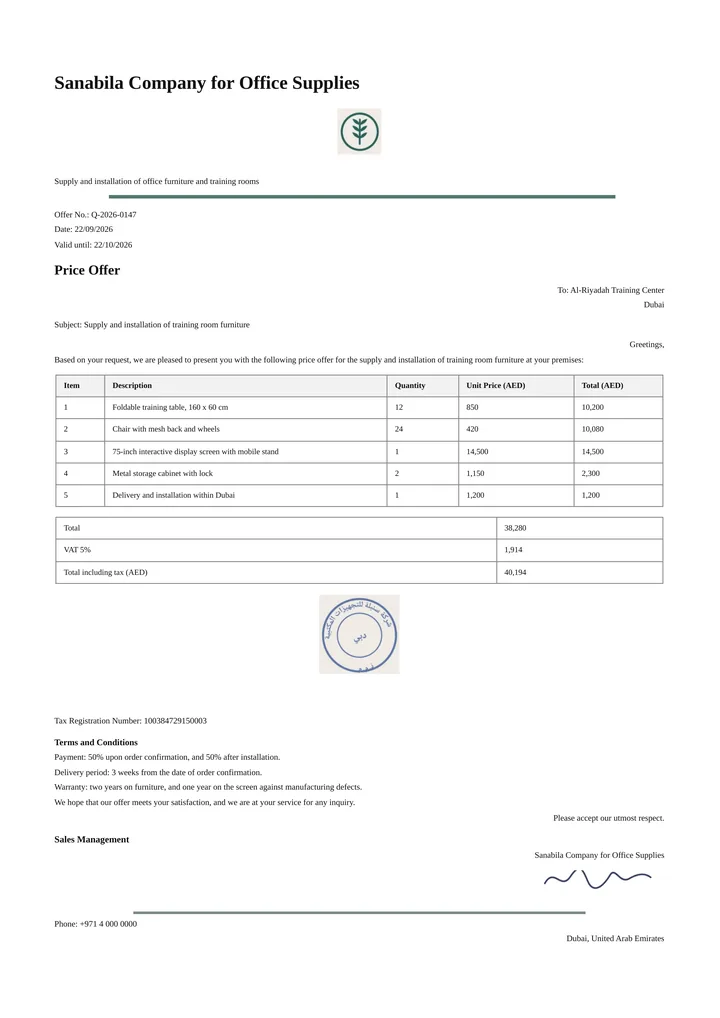
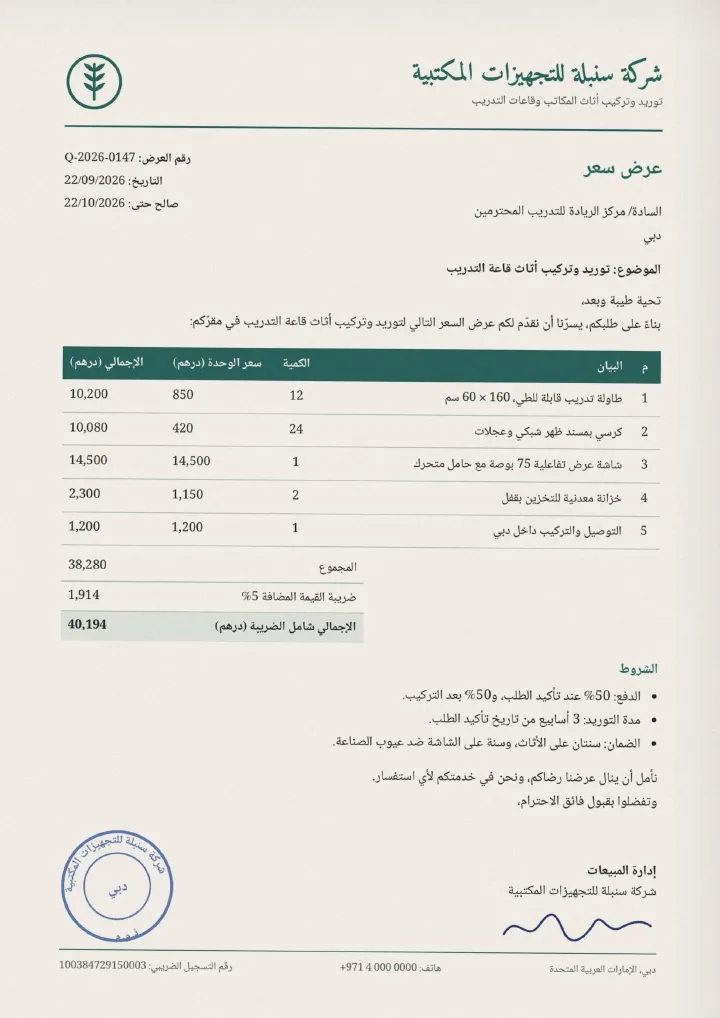
A one-page price quote in Arabic, scanned: a picture of the page, with no text inside. Drag the line to see the English PDF linglo made from it on 12 October 2026. This is linglo’s output, unedited.
- In
- 1 page, scanned. An image only: no text you can select.
- Out
- A clean English PDF rebuilt from the scan: the same content in the same order, with real text you can copy and search.
- Numbers
- Every price, quantity and total unchanged, from 850 to 40,194 AED. The 15-digit tax number came out exact.
- Time
- About 30 seconds on linglo.io.
- Cost
- 1 page. The Free plan includes 5 a month.
What isn’t perfect yet
- The page is rebuilt, not traced: the cream paper and the exact places of the logo and the stamp aren’t kept.
- The green table header comes back light grey.
- The stamp and the signature are copied from the scan as pictures, so the writing inside the stamp stays in Arabic.
Why a scan? Google Translate’s document upload leaves scanned pages in the original language. Its help page says text in scanned PDF pages shows up in the output “but they aren’t translated”, and that document translation “isn’t available on smaller screens or mobile” (checked 30 September 2026).
Check it yourself: the scan and linglo’s English PDF (both PDF). The English page comes from a two-page test file run on 12 October 2026; we cut it out unchanged. The company and the quote are made up; this is not a customer’s file.
How it works
- Drop your Arabic PDFUp to 500 pages, 50 MB. Scanned or born-digital.
- Choose EnglishSet English as the target — add any names or terms to keep as they are.
- Download the English PDFSame layout, clean selectable text, no watermark.
Why linglo
- Nothing gets lost.Tables, figures and footnotes come back in the same order — you get a finished document, not a wall of text to reassemble.
- Real, selectable English.Copy, search and edit the output — not a flattened picture of the page.
- The Arabic read correctly.Right-to-left source and joined letters understood properly, so the English actually makes sense — not word-salad.
- Numbers in the right place.Figures and dates carry over cleanly, with Western digits 0-9.
- No watermark.Your document stays yours. Nothing stamped across it.
Questions, answered
Does it keep the original layout?
It depends on the page, scanned or not. Visual pages like covers, charts, diagrams and catalogues keep their exact look, with the English written on top. Text pages like letters, quotes and reports come back as a clean rebuilt page: the same content and tables, in the same order. The scanned quote below is a text page.
Is the English real text or an image?
Real, selectable text you can copy, search and edit — not a flattened picture.
How big a PDF can I translate?
Up to 500 pages and 50 MB per file. The Free plan includes 5 PDF pages a month; paid plans go up to 3,000 pages a month.
Do you keep my file?
No. We don’t train on your documents, and files auto-delete from storage within 24 hours. You can delete them yourself anytime too.
Going the other way? Translate PDF to Arabic, or handle an Arabic Word file to English.
Try it on one real file — it’s free.
Start freeMore document translators:
Arabic Word to English Arabic to English (all) PDF to Arabic Word to Arabic PowerPoint to Arabic Excel to Arabic App & game localization All formats Pricing
Home · Pricing · Privacy · Terms · contact@linglo.io